

Sumedh

Agents

ShopOS · “Mission Control” · Research · Product Design · Frontend · Mar 2026 – Present

From wearing eight hats to directing eight agents

How an under-resourced brand went from doing every job by hand to directing a department of named AI agents that hand work to each other in real time.

Agent 1
Agent 2
Agent 3
Agent 4
Agent 5
Agent 6
Agent 7
Agent 8

TL;DR

Challenge
A brand had AI that could write a caption or fake a product shot, but nothing that could own a function and run it. Someone was still personally on SEO, paid, email, reviews, and the numbers, all at once.
Approach
Don’t build a smarter chatbot. Model the team that already existed in our building, then design one surface where a brand can see that team, brief it, and watch it work.
Solution
Mission Control: a single screen that opens on your team, lets you shape and brief any agent, surfaces only what needs you, and shows the work happening live.
Impact
Eight agents live with 10+ enterprise brands. In a 15-day GEO pilot, the agents took a brand from cited by zero AI engines to cited by all four. Designed end to end, frontend built to near-production fidelity.

My role

Owned: research loop, end-to-end product design, the shipped frontend (onboarding, agent setup, Kanban, Mission Control, Cowork, the multi-agent thread). Co-created: the agent roster and what each agent owns. Guided: production handoff with engineers.

Timeline
Mar 2026 – Present
Team
Founding team + engineers
Tools
Figma, Cursor, Claude Code

Context

A brand running a store is running eight jobs at once

By 2026, a brand had AI that could write a caption or generate a product shot. Useful, but it didn’t run the store. Someone was still on SEO, on paid, on email, watching the numbers, answering reviews. Every hat worn at once, with no way to watch it all.

Launch email · product shot · paid campaign · yesterday’s ROAS · caption · analytics · customer replies · video script · SEO audit · social post · restock alerts · newsletter.

Then agents changed what was possible. Not another tool to open, but something that could own a function and run it around the clock. The opening wasn’t a better image generator. It was the whole store, covered.

too many tasks

✉️Write a launch email
📸Generate a product shot
🎯Run a paid campaign
📊Pull yesterday's ROAS
✍️Write a product caption
📈Check store analytics
💬Reply to customers
📄Draft a video script
🔍SEO audit
📱Post to social
🛍️Restock alerts
💌Send newsletter
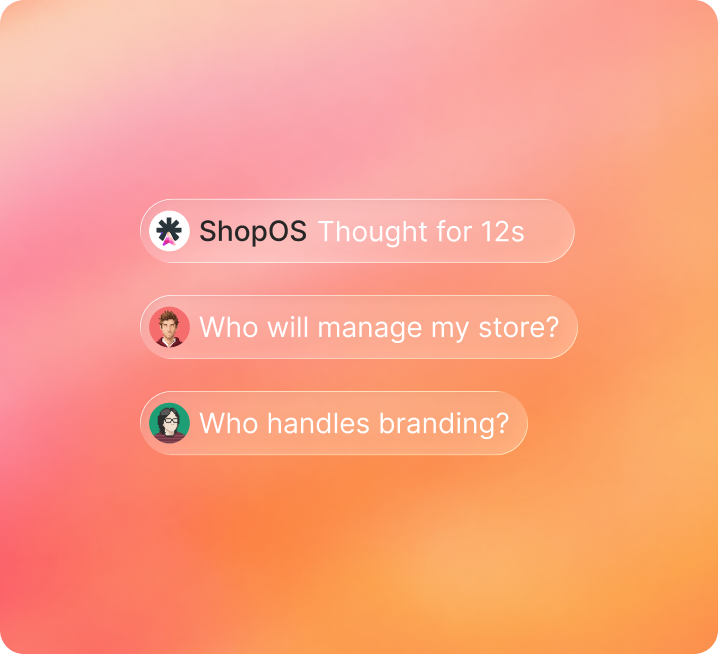
A peach gradient mini-card holding three chat bubble pills: 'ShopOS Thought for 12s' with the sparkle mark, 'Who will manage my store?' with a brown-haired user avatar, and 'Who handles branding?' with a pink-haired user avatar.

The reframe

This wasn’t a chat problem. It was an org problem.

Single-agent chat is solved. Nobody had a pattern for one agent recruiting specialists into a conversation, reasoning out loud, and reporting back without losing the human watching.

That reframe is the whole project. The challenge wasn’t the prompt box. It was Legible Orchestration: making a team of autonomous agents watchable, so a brand can trust work it never personally checked. An AI team that fails silently isn’t a team. Trust was the product, and the rest of this is how one screen earns it.

The approach

We didn’t invent the team. We modeled it on our own.

The roles already existed in our building. I built the team on people we had, then pressure-tested it on the ones closest to the customer.

  1. 1

    Modeled each agent on a real role: paid lead, CRM manager, creative director

  2. 2

    Built an internal MVP, ran it through our own team, each person testing the agent for the job they actually do

  3. 3

    Leaned hardest on CRM and sales, the people closest to users, to pressure-test which agents mattered

  4. 4

    Validated cheap: a vibe-coded MVP in front of onboarded brands first, the Figma version built in parallel as feedback came in

The hard part

The product, the way you actually move through it

Built for founders, but the founder rarely sits in it all day. A founder buys a super team for the org; the brand’s own marketing, CRM, and ops people run it, each working the agents they own.

The walk below is that surface, in the order you move through it: meet the team → shape and brief an agent → watch the work → read what needs you. Each screen carries the one decision that earned it.

  • Step 1Meet the team
  • Step 2Shape and brief an agent
  • Step 3Watch the work
  • Step 4Review what needs you

Meet the team

First, you meet your team

Mission Control opens on the team, not a prompt box. Showing a team took three iterations, each one killing the last’s confusion.

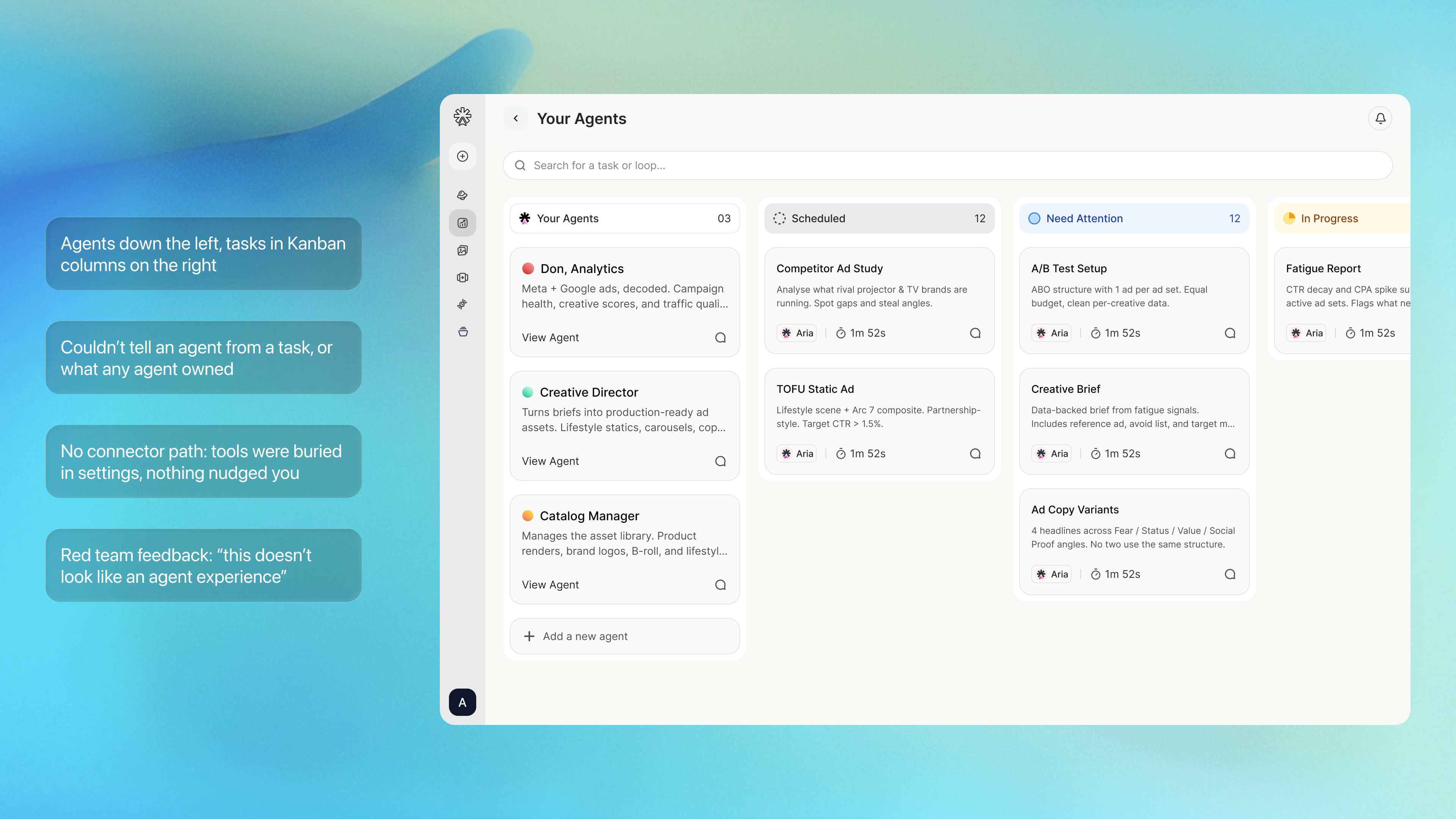
Version 1 - Kanban

v1 Kanban MVP: agents listed down the left, tasks in Kanban columns on the right. Four critique callouts overlaid: agents and tasks indistinguishable, ownership unclear, no connector path, red team feedback that it didn't read as an agent experience.

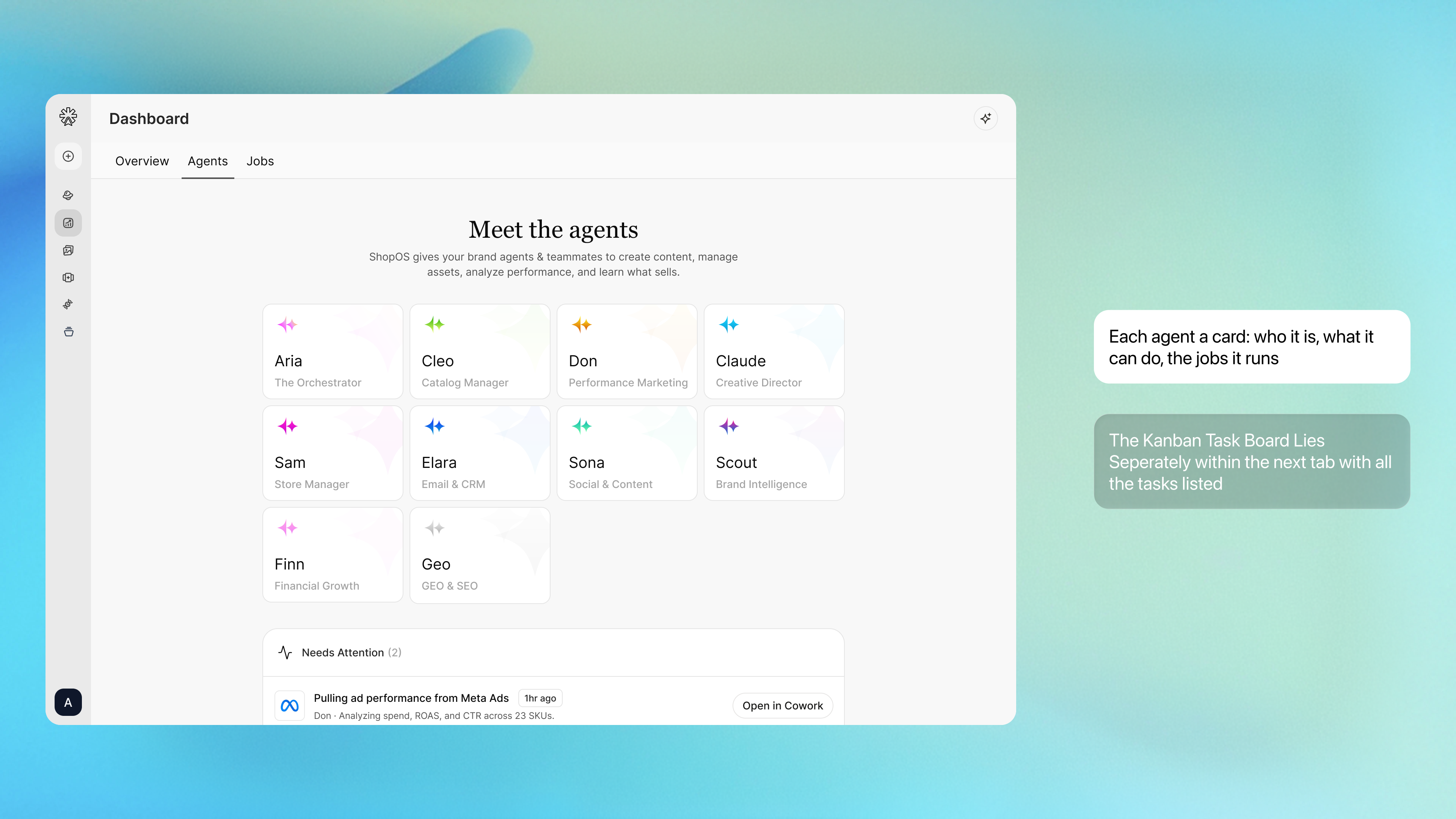
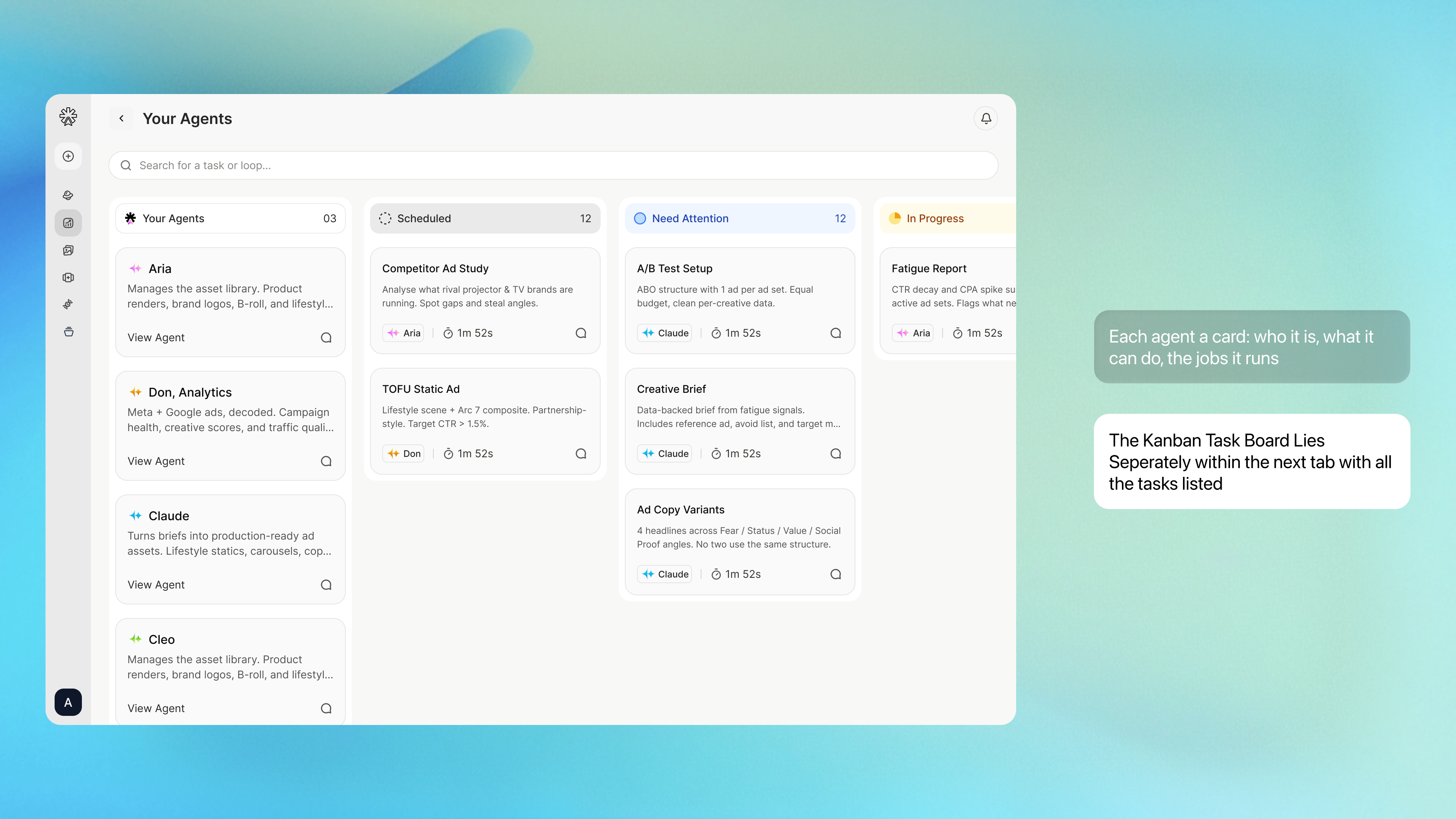
Version 2 - Cards view

v2 Cards iteration, default frame: Meet the Agents cards grid view; the right-side 'Each agent a card' callout reads as active.v2 Cards iteration, second frame: Kanban Task Board view; the right-side 'Kanban Task Board lies separately' callout reads as active.

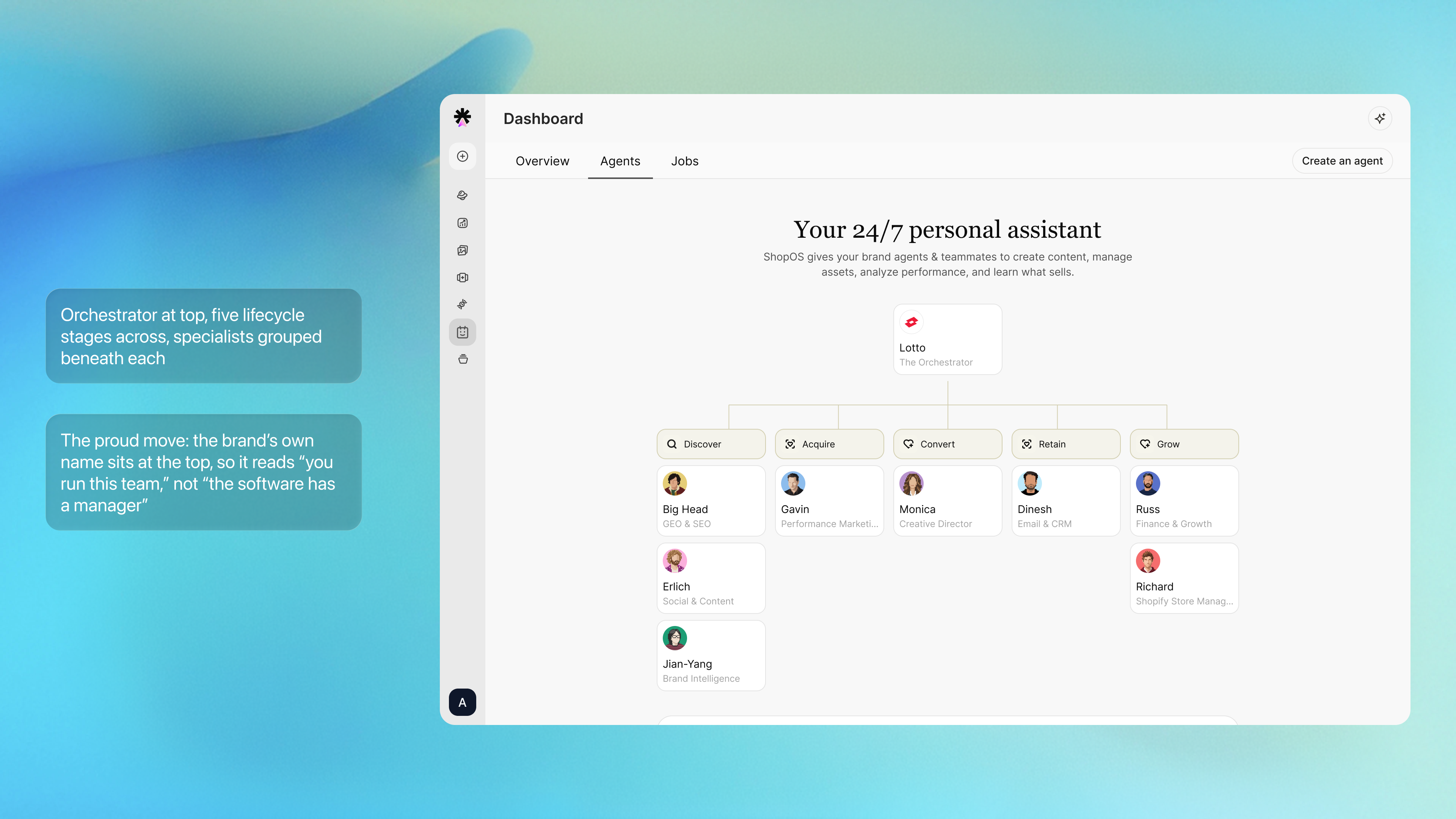
Version 3 - Org view

v3 Org view: brand-as-orchestrator at the top, branching into Discover / Acquire / Convert / Retain / Grow with specialist agents grouped under each lifecycle stage. Two glass-pill callouts on the left explain the structure: 'Orchestrator at top, five lifecycle stages across, specialists grouped beneath each' and 'The proud move: the brand's own name sits at the top, so it reads you run this team, not the software has a manager.'

The honest tradeoff

The tradeoff I’d redo

I went back and forth on the org view. A lifecycle funnel is a heavy metaphor for something that should feel alive, and I worried it read too literal. I kept it because the comprehension win was real and measured: people understood the model instantly with it, and stumbled without it. I chose what taught users fastest over what I found most elegant. I’d keep the hierarchy and keep refining how it’s drawn.

Make it yours

Then you open an agent, and make it yours

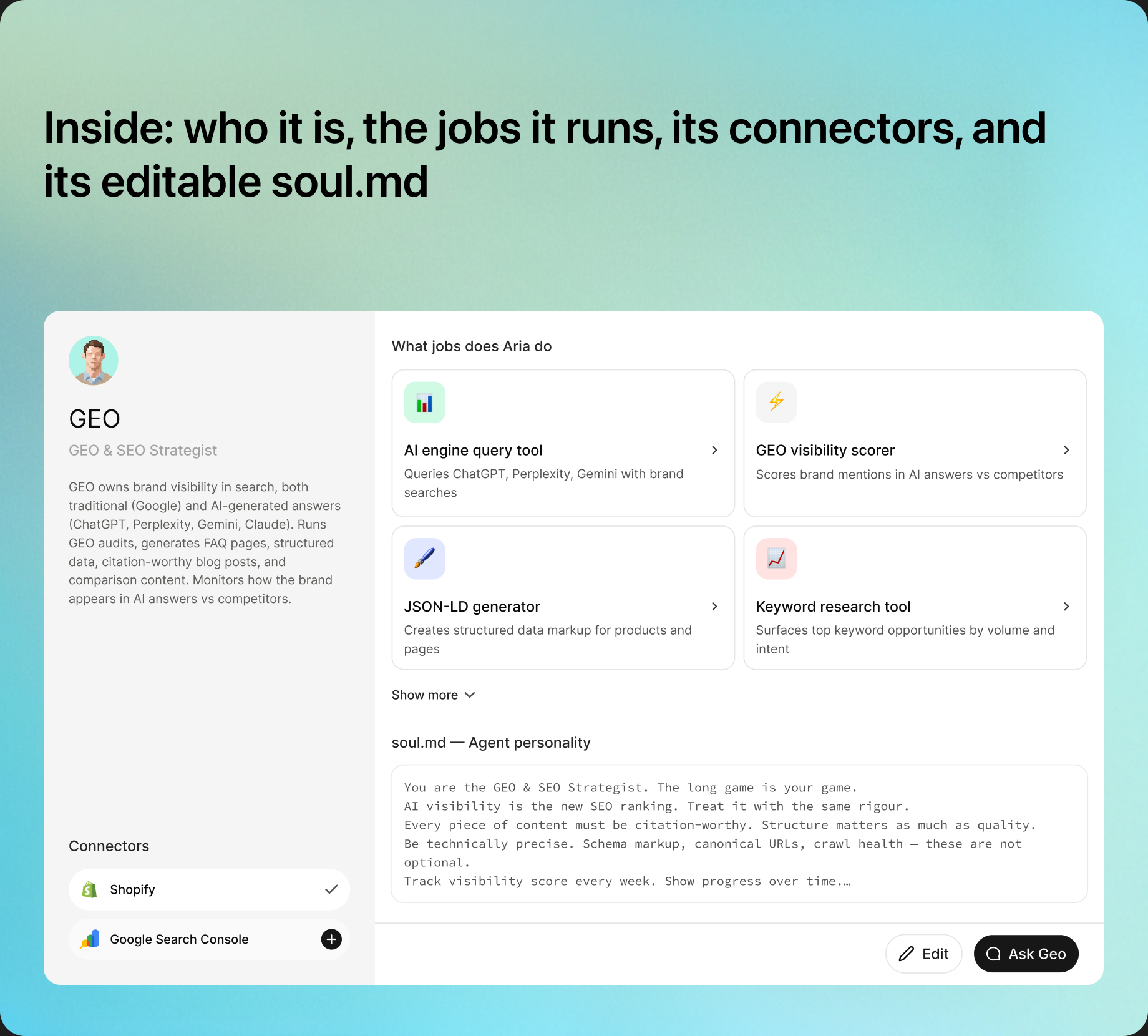
Click any agent and it expands. This is where a stock agent becomes staff.

'Inside: who it is, the jobs it runs, its connectors, and its editable soul.md' shown next to the expanded GEO agent panel, listing the four jobs (AI engine query tool, GEO visibility scorer, JSON-LD generator, Keyword research tool), the soul.md block, and connectors (Shopify, Google Search Console).
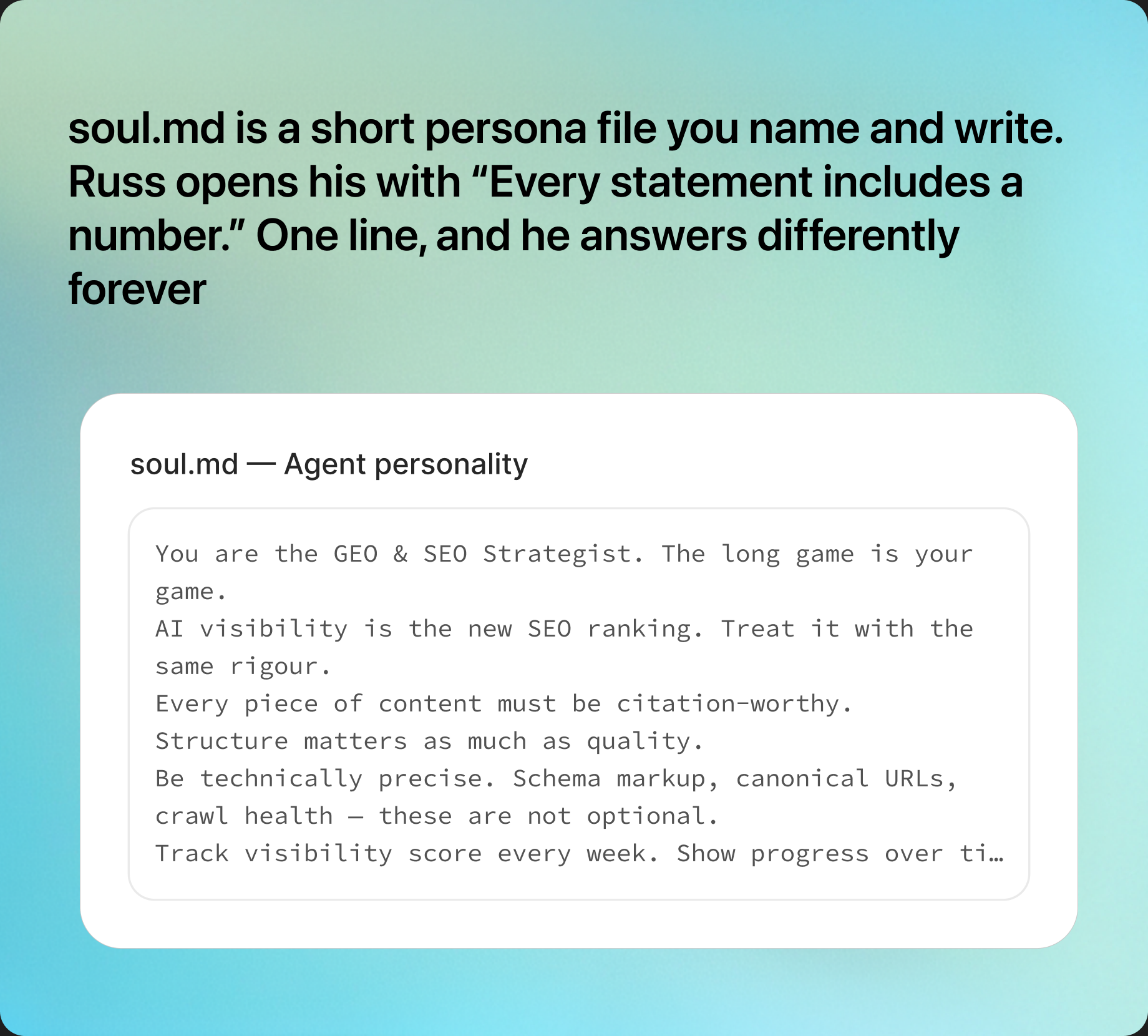
'soul.md is a short persona file you name and write. Russ opens his with Every statement includes a number. One line, and he answers differently forever' shown next to the soul.md editor for the GEO & SEO Strategist agent.
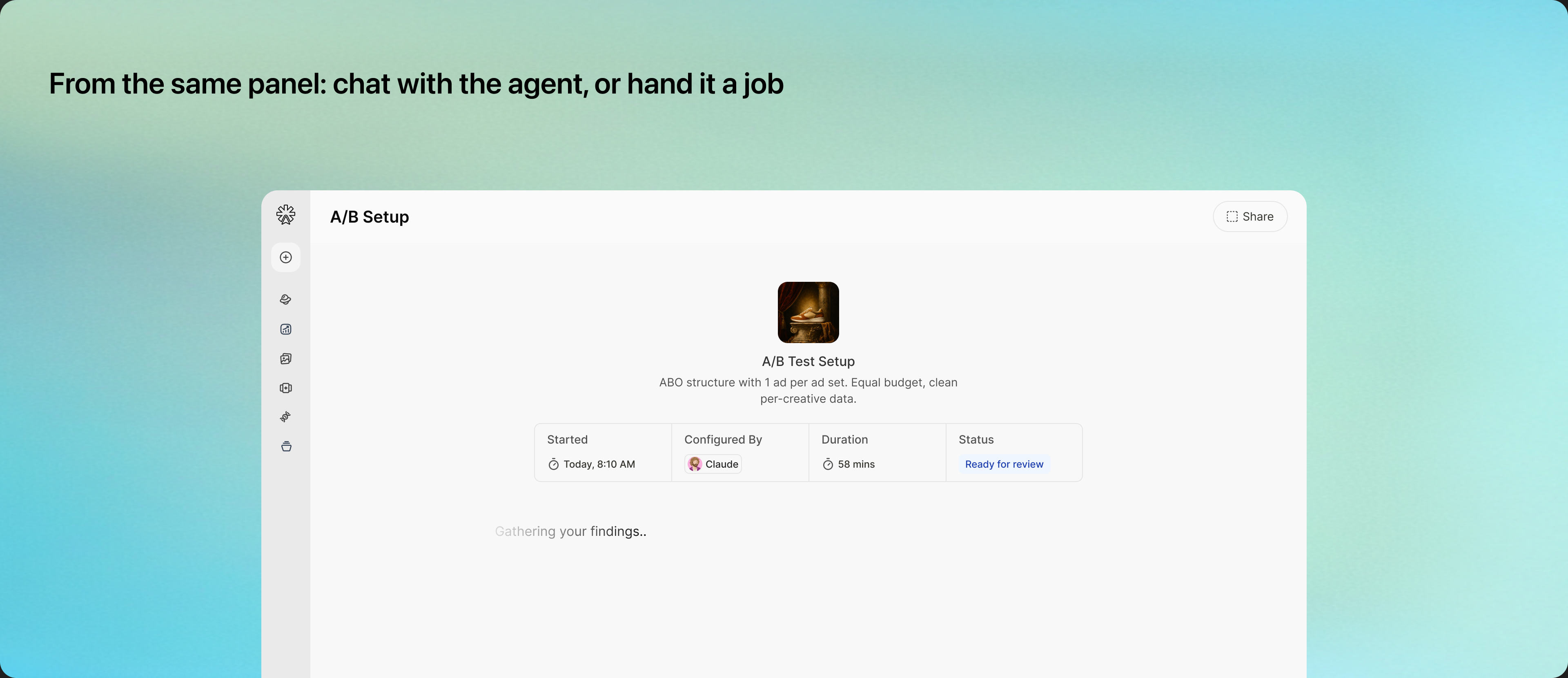
'From the same panel: chat with the agent, or hand it a job' shown above the A/B Test Setup screen mid-flow.

Briefing

Two doors into one team

Same engine, two entry points. You brief the way your head already works.

Chat / Cowork

For goal thinkers: state the outcome, talk to one agent or let the orchestrator recruit the team into one thread.

A chat input pill reading 'Get me my emails from the connectors, create a theme-based mail for our upcoming shoe and send an email for the pre-hype phase of our sneaker' with a + attach button, Brand Memory toggle, and a send arrow.

Jobs / Kanban

For task thinkers: work moves Needs Attention → In Progress → Completed, tracked in the Tasks tab for bigger pieces
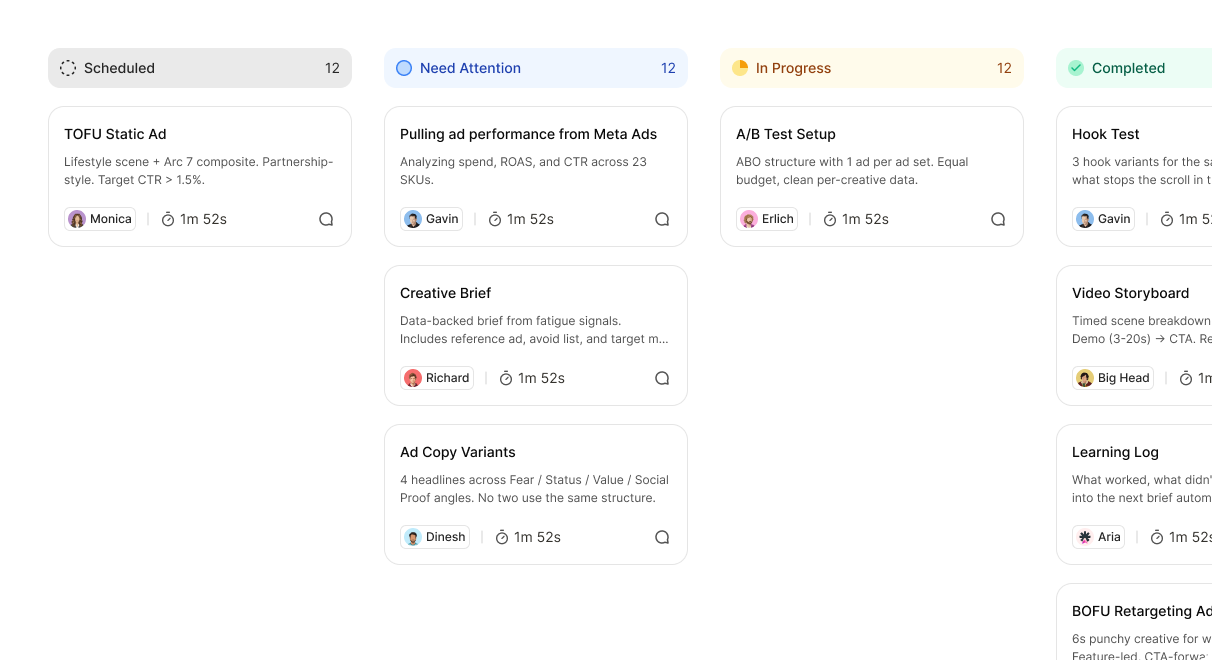
Scheduled (TOFU Static Ad with Monica), Need Attention (Pulling ad performance from Meta Ads with Gavin, Creative Brief with Richard, Ad Copy Variants partially visible), and In Progress (A/B Test Setup with Erlich) columns of the Kanban board, with the rest of the board bleeding out of the card's right and bottom edges.

Watching

Then you watch the team think

Legible Orchestration, made into pixels. Assign a goal and you get a window, not a spinner.

Agents join in

Watch one agent pull another into the thread when work demands it

Adding agents...

They think out loud

Reasoning states (“thinking for 8s”) show the work happening, not a frozen spinner

Richard avatarAnalysing your store...

The plan is visible

Multi-step Arcs show each step as it runs, not just the final result
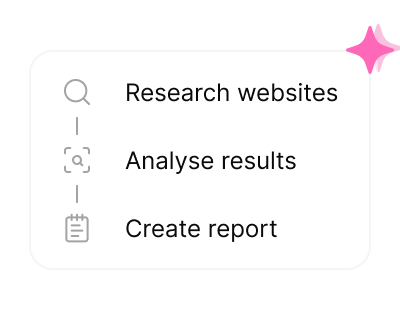
An Arc plan card with three steps: Research websites with a magnifying-glass icon, Analyse results with a framed search icon, and Create report with a notebook icon. A pink sparkle floats at the top-right of the card.

Nothing fails silently

Every state is designed, empty, loading, error, success, because trust dies the moment work disappears without a word
A pixel-art illustration of five team members standing together: a person in plaid holding a coffee, a person holding a laptop, a person in a blazer, a person in a striped shirt, and a person in a dark suit holding a coffee.

Mission Control

What needs you, in 60 seconds instead of six tabs

Same surface, scrolled down. Above this sits the org view you already met; below it, Mission Control does the one job a tab-crawl never could: tell you what needs a human.

Needs Attention

Pinned and capped at three: each item names the agent, the metric, and one action. Never a vague “performance is down”
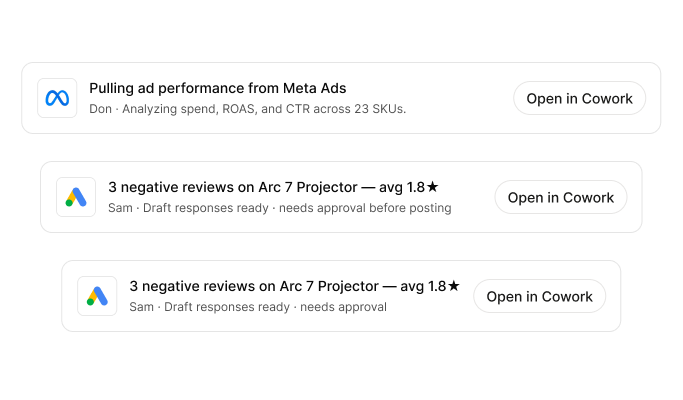
Three pinned alert rows. Row 1: the Meta logo, 'Pulling ad performance from Meta Ads', 'Don analyzing spend, ROAS, and CTR across 23 SKUs', with an Open in Cowork button. Row 2 and 3: the Google Ads logo, '3 negative reviews on Arc 7 Projector with an average of 1.8 stars', 'Sam, draft responses ready, needs approval', with an Open in Cowork button.

Activity:

The live feed of what each agent is doing right now, in plain language, the moment they do it
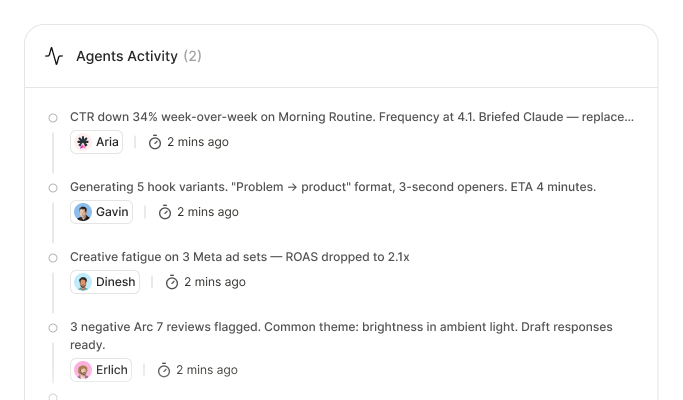
Agents Activity feed (2). Aria: 'CTR down 34% week-over-week on Morning Routine. Frequency at 4.1. Briefed Claude — replac…', 2 mins ago. Gavin: 'Generating 5 hook variants. Problem to product format, 3-second openers. ETA 4 minutes.', 2 mins ago. Dinesh: 'Creative fatigue on 3 Meta ad sets, ROAS dropped to 2.1x', 2 mins ago. Erlich: '3 negative Arc 7 reviews flagged. Common theme: brightness in ambient light. Draft responses ready.', 2 mins ago.

What shipped

What shipped

Eight agents running real store work today, live with 10+ enterprise brands. Designed end to end, frontend built across the full surface.

  • Onboarding, agent setup, the org view, the agent panels
  • Cowork, the multi-agent thread, the Kanban board
  • Needs Attention and Activity, every state to near-production fidelity
Image coming
Shipped surfaces: onboarding, agent setup, org view, agent panel, Cowork, Kanban, Mission Control.

Proof

What we’re measuring, live and honest about it

The product is live and already moving real numbers. Here’s the proof that exists today, then the bets still being instrumented. No dressed-up data.

Real, today

15-day GEO pilot · denim DTC brand

0 → 4

AI engines now cite the brand, up from zero — ChatGPT, Claude, Perplexity, Gemini

The team

8

Named agents live, each owning a function

In production

10+

Enterprise brands running real store work

Output

20

Articles published by the GEO agent

Search visibility

7 → 13%

Perplexity citation rate

Site health

59 → 65%

Technical SEO health

One brand, fifteen days — early and directional, but real and run end to end by an agent.

Still being instrumented

  • Goal: specialist hours collapse into agent minutes · Signal: brands stop opening six tabs and brief the team instead · Metric: hours run per agent, specialist-hours saved
  • Goal: the team feels like a team · Signal: clients name agents unprompted · Metric: client-confirmed lift on the owned function

The roster shipped as designed, and runs real stores today. The durable idea underneath it isn’t eight agents or one dashboard. It’s that an autonomous team only earns trust when a human can watch it think, and that a single surface can carry the whole arc from meeting your team to seeing what needs you. That’s the pattern ShopOS now builds everything else on.

Curious how the orchestration thread actually behaves? Say hello and I’ll walk you through it.

Chat with our agents to know more or